
No Costume Needed. Just Your Photo.
AI Halloween Costume Generator – Try 10 Looks From a Photo
Want to see yourself in a Halloween costume without dressing up? Explore ten costume styles and choose your favorite before uploading a photo. Create a witch, vampire, zombie couple, monster group or playful cat costume portrait. Each style has its own photo requirements. Generate a personalized 3:4 Halloween image for 1 credit without writing a prompt.
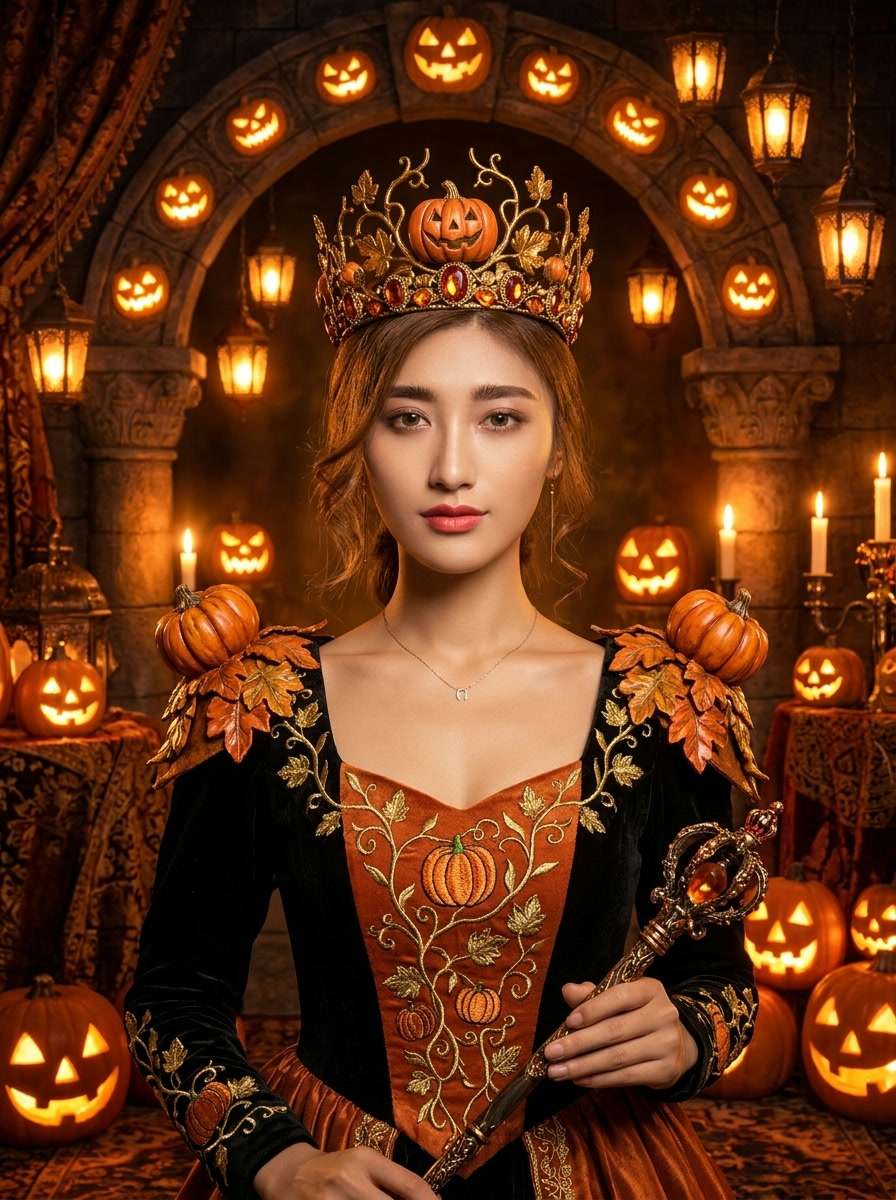 Generated example
Your Halloween character
Pumpkin Royal
Single person · Generated example
Create a fantasy Halloween royal portrait with orange-and-gold clothing, a delicate vine crown and an enchanting pumpkin palace background.
Choose a costume
Swipe to explore all 10 looks. Selecting a look never uses credits.
Choose a look first. Add your photo in the next step.
Make it yours
Create With the AI Halloween Costume Generator
Ready to try your selected look? Upload a clear photo that matches the costume’s subject requirements: one adult, two adults, four adults, a child with guardian permission or a cat. The AI uses your photo as a reference while changing the costume and surrounding scene. Results may vary from the example.
Pumpkin Royal
Single person
- Output
- Portrait · 3:4
- Generation
- 1 credit
Preview your result before downloading.
Buy credits
Credits work across all our generators. Images use 1 credit, Halloween videos use 4 credits, and Zombie Love Story videos use 10 credits.
Checking checkout availability…
No subscription. Purchased credits do not expire.
From inspiration to your image
How to Use the AI Halloween Costume Generator
- 01
Choose Your Costume Style
Browse the 10 Halloween costume examples. Select a witch, vampire, couple, group, child or cat look that matches your photo.
- 02
Upload Your Photo
Choose one clear, well-lit image with the intended subjects visible. Follow the selected style’s photo requirements, confirm permission and check the credit cost.
- 03
Generate and Download
Submit your AI costume photo for 1 credit. Review the generated 3:4 portrait and download the image when it is ready.
Dress up your imagination
10 Looks in the AI Halloween Costume Generator
Find a Halloween look that matches your style. Browse the costume examples, choose a character and see the creative direction before uploading your own photo. Selecting or changing a costume is free.
These are AI costume concepts. Lighting, fabrics and the setting can change together; the finished image may differ from the reference sample.
Graveyard Witch
Transform your portrait into a mysterious Halloween witch surrounded by moonlight, ancient gravestones and glowing green magic. A cobweb cloak completes the gothic fantasy look.
Gothic Vampire
Create an elegant vampire costume portrait with dark velvet clothing, dramatic crimson lighting and a haunting stone crypt background.
Zombie Couple
Turn a photo of two consenting adults into a theatrical zombie couple wedding portrait. The scene combines gothic romance, candlelight and a haunted manor setting.
Monster Squad
Transform one group photo containing four adults into a coordinated Halloween monster portrait. Each person receives a distinct costume within the same moonlit scene.
Little Ghost
Create a charming child-friendly Halloween ghost costume portrait with a cozy pumpkin-lit porch. A parent or guardian must authorize the child's photo.
Witchy Cat
Turn your cat's photo into an enchanting Halloween pet portrait with a tiny witch hat, warm autumn lighting and magical pumpkin decorations.
Candy Corn Costume
Try a playful Halloween outfit inspired by candy corn colors. Bright orange, yellow and white details create a cheerful trick-or-treat portrait.
Haunted Web Hero
Create an original web-inspired Halloween hero costume for a child, with a playful city backdrop and an adventurous comic-book atmosphere.
Moonlit Sorceress
Transform your portrait into a magical sorceress wearing elegant velvet, holding a glowing crystal orb and standing in an enchanted moonlit forest.
Pumpkin Royal
Create a fantasy Halloween royal portrait with orange-and-gold clothing, a delicate vine crown and an enchanting pumpkin palace background.
Before your transformation
Halloween costume questions
Does the AI Halloween Costume Generator create photos or videos?
This tool creates still Halloween costume images from uploaded photos. Choose one of ten preset styles and generate a personalized 3:4 portrait for 1 credit. It does not animate your photo. For an animated clip, use our separate Halloween AI Video Generator.
Is choosing a costume template free?
Yes. Browsing examples, selecting a look and switching templates do not use credits. Credits are used when you submit a generation; each generated photo costs 1 credit.
What is an AI Halloween costume generator?
An AI Halloween costume generator transforms an uploaded photo into a Halloween-themed portrait. It uses a prepared costume style to change clothing, accessories and background while attempting to preserve recognizable features.
Can I see myself wearing a Halloween costume without buying one?
Yes. Choose one of the available AI costume styles and upload your photo to create a visual costume concept. The result is an AI-generated image, not a guarantee of how a physical costume would fit or look.
Can I make matching Halloween costume photos for couples?
Yes. The Zombie Couple style supports one reference photo containing two consenting adults. Both people should be clearly visible. You do not need to upload two separate images for this template.
Can I create a Halloween costume for my cat?
Yes. The Witchy Cat style is designed for cat photos. Upload a clear picture showing your cat's face and fur markings. Other pet species are not currently supported by this template.
How many Halloween costume styles are available?
There are 10 ready-made styles, including Graveyard Witch, Gothic Vampire, Zombie Couple, Monster Squad, Little Ghost, Witchy Cat, Candy Corn Costume, Haunted Web Hero, Moonlit Sorceress and Pumpkin Royal.
How do I use the AI Halloween Costume Generator?
Browse all ten sample looks and tap a thumbnail to change the large preview. Use This Look takes you to the photo workspace. Browsing and switching looks never starts a model request or uses credits.
Which Photo Should I Upload for My Halloween Costume?
Choose a sharp, well-lit photo with the subject clearly visible. A waist-up or full-body photo gives the model more clothing and pose context. Follow the selected look’s guidance: one adult, two adults, four adults, a child with guardian permission, or one cat.
Do couples need one photo or two separate uploads?
No. The couple look uses one photo containing two adults; Monster Squad uses one group photo containing four adults. Keep every person visible. We do not claim automatic subject-count verification.
Can I use a child’s photo or a pet photo?
The Little Ghost and Haunted Web Hero looks are intended for age-appropriate child portraits with parent or guardian permission. Witchy Cat is for a cat photo. The account holder must be an adult and have the right to use every photo.
Which files and sizes are supported?
Upload JPG, PNG or WebP up to 20 MB, with at least 512 pixels on each side and no more than 24 megapixels. We correct orientation, remove metadata and prepare a JPEG up to 2 MB before sending it. Very small or damaged images are rejected rather than enlarged.
How much does an AI Halloween costume image cost?
Each submitted image generation uses 1 credit. A one-time credit pack starts at $1.99. The amount and your balance appear before generation. A retry is a new paid generation. Failed or rejected generation tasks return their generation credits through the existing credit ledger. Browsing costume previews does not consume credits.
Can I download results from the AI Halloween Costume Generator?
Your completed image appears privately on this page with Download Image. We attempt input and output checks for operational review. Screening outcomes do not automatically cancel a valid generated file or return its credits. The download is your generated file, not a template sample, in portrait 3:4 format.
Will the result look exactly like my photo?
The prompt asks the model to retain recognizable features and the number of subjects while changing the costume and setting. AI can make mistakes with faces, hands, fabric and group layouts. Review your own result; sample looks illustrate the direction and are not a guarantee.
Samples illustrate the style; your result will vary.